Syncro Snapshot Launch Recap: A Free, Zero-Friction Microsoft 365 Security Assessment for MSPs
In this post, I recap our live webinar with Kelvin Tegelaar, founder of CyberDrain, where we walked through why we built Syncro Snapshot and demonstrated it live. I share the real MSP assessment gaps that led to this project, how Kelvin and I partnered to remove friction from Microsoft 365 security assessments, and how Snapshot delivers fast, executive-ready insights without storing credentials or tenant data. I also highlight key moments from the demo and point readers to the webinar replay to see the tool in action.
SECURITYPODCAST
Rich Dean
12/13/20254 min read
Why We Built Syncro Snapshot
When Kelvin Tegelaar from CyberDrain and I sat down to plan our recent webinar, we weren’t trying to launch just another security tool. We were trying to solve a problem we both kept hearing about from MSPs over and over again.
Microsoft 365 security assessments are harder than they need to be.
You know the reality. To show value early, MSPs are often stitching together scripts, spreadsheets, portal screenshots, and gut instinct. Or worse, asking a prospect to onboard into a full platform before any trust or contract exists. That friction slows everything down and makes security conversations awkward when they should be straightforward.
That gap is why we built Syncro Snapshot.
If you missed the live session, you can watch the full webinar replay here:
https://www.youtube.com/watch?v=Ji6HVlkvtk0
The problem we kept seeing
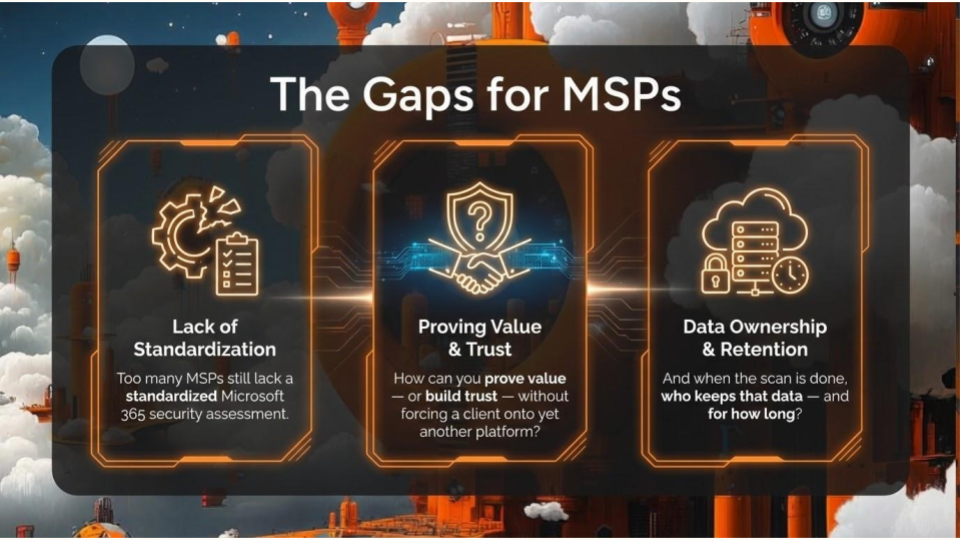
From partner conversations, advisory boards, and customer interviews, one thing stood out clearly. Only a small percentage of MSPs have a standardized, repeatable way to assess Microsoft 365 security early in the relationship. Most are still improvising.
That leads to three challenges:
It takes too long to prove value
Trust is hard to establish when you ask for deep access too early
Customers worry about where their data goes and who keeps it
We wanted to flip that on its head.
📖 If you want the longer backstory on how this idea came together, I wrote about it in more detail here:
https://www.365insights.blog/the-story-behind-syncro-snapshot
What Syncro Snapshot is
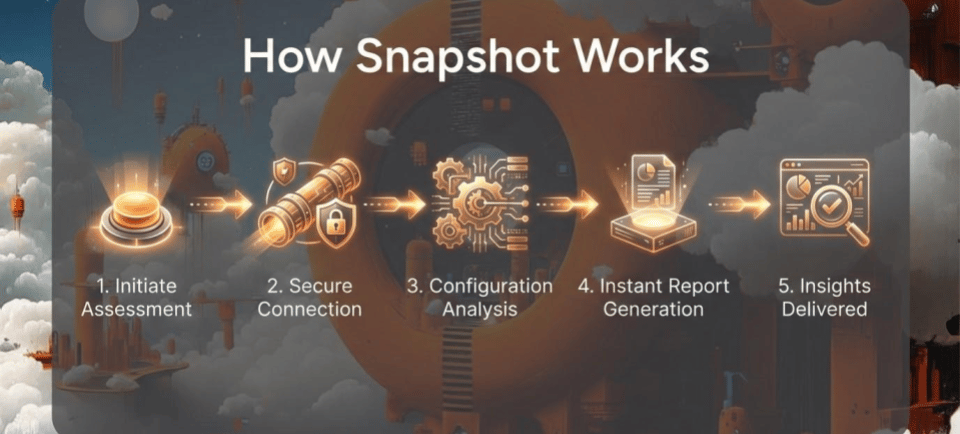
Syncro Snapshot is a free, browser-based Microsoft 365 security assessment built with MSP workflows in mind. It gives you a fast, read-only view of a tenant’s security posture and generates an executive-ready report you can use immediately.
There’s no onboarding. No agent. No stored credentials. No tenant data retained.
You connect, run the assessment, review the results, and have the conversation. That’s it.
You can learn more or try it here:
https://syncromsp.com/platform/m365/snapshot-security-assessment/
What we showed in the webinar
During the live demo, Kelvin and I walked through how Snapshot works and what it surfaces. The goal was simple: give MSPs meaningful signal without forcing them to jump through ten different portals.
Snapshot highlights things like:
Microsoft Secure Score and top improvement areas
Common identity and configuration missteps
MFA coverage and modern authentication gaps
Excessive global admin access
Guest access and invitation risks
Stale users, unused licenses, and forwarding rules
Application registrations and non-human identities
Conditional Access and email security controls for Business Premium and above
All of that shows up instantly in a live dashboard, backed by a report that executives can actually understand.
Designed for trust, not lock-in
One thing we were very clear about in the webinar is how Snapshot handles security and privacy.
Everything runs in the browser. Access is session-based. Tokens expire. Snapshot is read-only. There’s no AI ingesting customer data and no background collection happening after you close the window.
That design matters because this tool is often used at the very beginning of a relationship. It should build confidence, not raise red flags.
Free, on purpose
Snapshot is free, and that’s intentional.
This isn’t about gating insight behind a paywall. It’s about helping MSPs raise the baseline of Microsoft 365 security conversations across the board. Whether you’re a Syncro customer, a CyberDrain customer, or neither, you can use it today.
Official launch announcement:
https://syncromsp.com/media-release/syncro-and-cyberdrain-launch-snapshot-a-free-microsoft-tenant-security-assessment-for-msps/
🧠 For those interested in the thinking and history behind Snapshot, I shared the full story here:
https://www.365insights.blog/the-story-behind-syncro-snapshot
Start the conversation
Security assessments shouldn’t feel like paperwork. They should feel like clarity.
Syncro Snapshot exists to help MSPs walk into a conversation, show real risk in minutes, and move quickly toward remediation and ongoing security work.
If you want to see it in action, watch the webinar replay:
https://www.youtube.com/watch?v=Ji6HVlkvtk0
And if you want to run your own assessment, you can start here:
https://syncromsp.com/platform/m365/snapshot-security-assessment/
Frequently Asked Questions
Is Syncro Snapshot free?
Yes. Syncro Snapshot is completely free and available to all MSPs, regardless of whether you are a Syncro or CyberDrain customer. There are no trials, subscriptions, or feature gates.
Does Snapshot store credentials or tenant data?
No. Snapshot is session-based and read-only. It uses a temporary access token that expires when the session ends or the browser is closed. No credentials or tenant data are stored.
Is any AI or agentic processing used on customer data?
No. Snapshot does not ingest data into AI models or run agentic analysis. All processing happens in the browser during the live session.
What permissions are required to run Snapshot?
A Global Administrator account is required to initiate the assessment. This ensures Snapshot can securely read the necessary Microsoft 365 configuration data while maintaining strict access boundaries.
What happens to the enterprise application after the assessment?
The enterprise application remains in the tenant, but access expires when the session ends. For cleanliness, it can be removed immediately after the assessment.
What licenses are required for Snapshot?
The basic report works with any Microsoft 365 tenant. Advanced checks, such as Conditional Access and additional security controls, require Business Premium or higher licenses.
Does Snapshot replace security assessments in Syncro?
No. Snapshot is designed as a fast, frictionless assessment tool, especially useful in pre-sales or initial security conversations. Ongoing monitoring, compliance mapping, and deeper assessments are handled through Syncro XMM and SIP.
Can I export the data?
The executive report is available as a PDF. Individual dashboard sections can be exported as CSV, and raw data can be viewed for further analysis.
Does Snapshot support third-party MFA solutions?
Yes, if the third-party MFA integrates using Microsoft’s modern authentication framework. Older ADFS-based integrations may not be detected.
Can Snapshot compare results to CIS or NIST frameworks?
Not today. Snapshot focuses on fast posture visibility. Compliance and framework-based reporting are planned and available through other Syncro solutions.
Can prospects run the assessment themselves?
Yes. A prospect can run the assessment live during a meeting, review the results together, download the report, and then close the session knowing access is revoked.
Is Snapshot open source or self-hosted?
No. Snapshot is a hosted service to ensure security, integrity, and ease of use.
Can I customize branding in the report?
Report customization is available today, and MSP logo branding is planned in an upcoming release.